
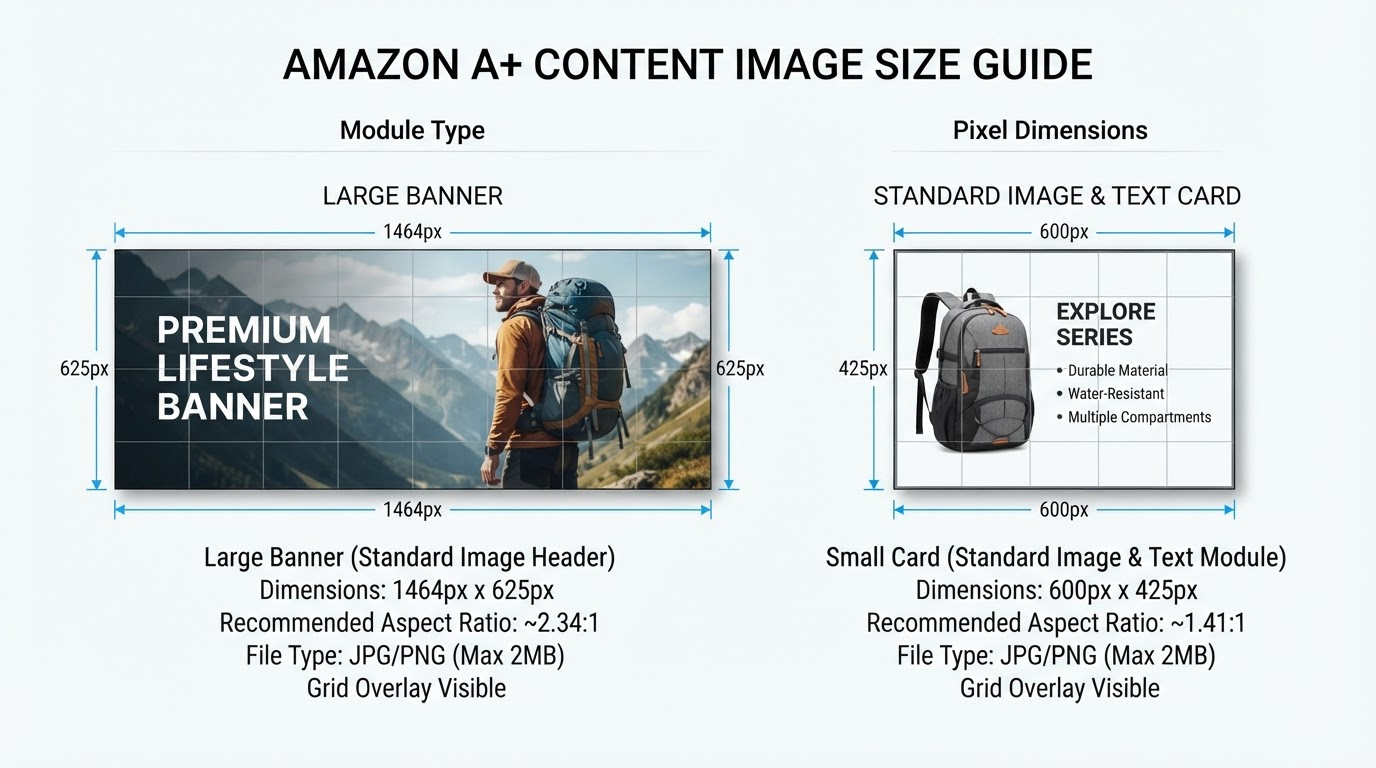
A+ Content Size Guide: 1464x625 and 600x425 Dimensions
Imagine this: You've poured hours into crafting the perfect Amazon A+ Content module, with stunning visuals that scream premium quality and bulletproof copy that converts browsers into buyers. You hit upload, refresh the page, and... blurry disaster. Your hero image looks like it was pixel-punched by a low-res gremlin, mobile shoppers squint at distorted cards, and Amazon flat-out rejects your submission. Sound familiar? It's the nightmare of every Amazon seller wrestling with A+ content size confusion.
Get the Amazon A+ content dimensions wrong, and your enhanced brand content—once a conversion superpower—becomes a liability. Blurry images erode trust, tank click-through rates, and slash sales by double digits. But fear not. This deep-dive unlocks the exact specs for premium A+ content 1464x625 and its trusty sidekick, 600x425. We'll decode the rules, dodge pitfalls, and arm you with pro tips to make your A+ shine across desktop and mobile. Ready to banish blur forever?
The Two Non-Negotiable Premium A+ Sizes
Amazon's Premium A+ Content demands precision. Forget guesswork—the platform enforces two core image sizes to ensure crisp rendering everywhere. The star is 1464x625 pixels, optimized for desktop hero banners where shoppers linger and decide. Its counterpart, 600x425, rules mobile views, product cards, and secondary displays, preventing the all-too-common mobile meltdown.
These aren't arbitrary; they're engineered for Amazon's responsive design. Use PNG for transparency and sharpness, aim for 72 DPI (web standard), and maintain the 1464:625 aspect ratio (roughly 2.34:1) to avoid cropping chaos.
| Size | Usage | Aspect Ratio | DPI | Format |
|---|---|---|---|---|
| 1464x625 | Desktop hero, primary modules | 2.34:1 | 72 | PNG |
| 600x425 | Mobile, cards, secondary | 1.41:1 | 72 | PNG |
Stick to these Amazon A+ content dimensions, and your visuals pop without rejection.
Which of the 7 Premium Modules Uses Which Size?
Premium A+ offers seven powerhouse modules, each with tailored size needs. The primary (1464x625) dominates expansive desktop layouts, while secondary (600x425) ensures mobile fidelity. Mismatch them, and expect distortion.
| Module Name | Primary Size | Secondary Size | Why It Matters |
|---|---|---|---|
| Hero | 1464x625 | 600x425 | Eye-catching desktop banner; mobile-first impact |
| Brand Banner | 1464x625 | 600x425 | Builds instant brand recall across devices |
| Feature 1 & 2 | 1464x625 | 600x425 | Highlights key benefits without cropping |
| Lifestyle | 1464x625 | 600x425 | Evokes desire in real-world contexts |
| Comparison Chart | 1464x625 | 600x425 | Readable specs that seal the deal |
| Ritual/Use | 1464x625 | 600x425 | Demonstrates effortless integration |
Common Size Mistakes That Kill Conversions
Even seasoned designers trip over these. Here's how to sidestep the traps that turn golden A+ into pixelated poison:
- Stretching Basic A+ 970px images to Premium: Basic modules max at 970x300—force them into 1464x625, and distortion kills professionalism. Always start fresh for Premium.
- Ignoring 600x425 for mobile: Desktop-only focus means 70% of traffic sees blurry cards. Dual-export or bust.
- Text in the unsafe zone: Amazon crops 100px from edges—vital headlines vanish, confusing shoppers.
- Exporting JPG with artifacts: Compression ruins edges. PNG only for lossless clarity in A+ content size battles.
These errors don't just reject uploads; they erode conversions by fracturing trust at first glance.
How to Export Both Sizes Without Double Work
Manual resizing? A soul-crushing loop of Photoshop tabs and ratio roulette. Enter smart tools like ApexAPlus, which generate both premium A+ content 1464x625 and 600x425 from one ASIN-specific design. Upload your canvas once, and it auto-scales visuals proportionally—no quality loss, no endless tweaks. Tailored to your product's hero shots and copy, these exports slot perfectly into Seller Central, saving hours per listing.
It's like having a design ninja that anticipates Amazon's quirks, ensuring every module renders razor-sharp.
Design Tips for 1464x625 That Actually Convert
Size mastered? Now make it sell. For 1464x625 heroes, high contrast is king—bold whites against deep blacks draw eyes like magnets. Anchor with ultra-high-res product shots (minimum 4K source) centered in the 100px safe zone, leaving edges breathable for crops.
Layer text hierarchy: Massive 100pt headlines for the win, 40pt subheads for benefits, micro-copy for specs. Use evocative visuals—a sleek coffee maker steaming mid-brew, not sterile studio shots—to spark desire. Test iterations: Does it stop scrolls on mobile previews? That's your north star.
Checklist Before You Upload
- Verify 1464x625 primary and 600x425 secondary PNGs at 72 DPI.
- Confirm aspect ratios: No stretching artifacts.
- Text and logos in central safe zone (100px margins).
- Preview on desktop/mobile simulators—crisp everywhere?
- ASIN-specific: Matches product images and branding.
- File sizes under 2MB per image.
- Test upload in Seller Central sandbox.
Get Both Sizes Done From Your ASIN
Nail your A+ content size game without the grind. With ApexAPlus, transform one design into Amazon-ready perfection. Try free with 1 ASIN today and watch rejections vanish. Scaling up? Grow at $29/mo for unlimited listings.
Your A+ Content deserves pixel-perfect execution. Ditch the guesswork, boost conversions, and let your products dominate the detail page. What's your first ASIN to upgrade?